
Complete Guide for an Inside the Box Picture
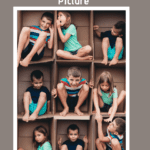
These "inside-the box" pictures are a blast for any subjects, and a huge creativity kick-starter.
In this post I will show you what you need, how to prepare, and how to edit these.
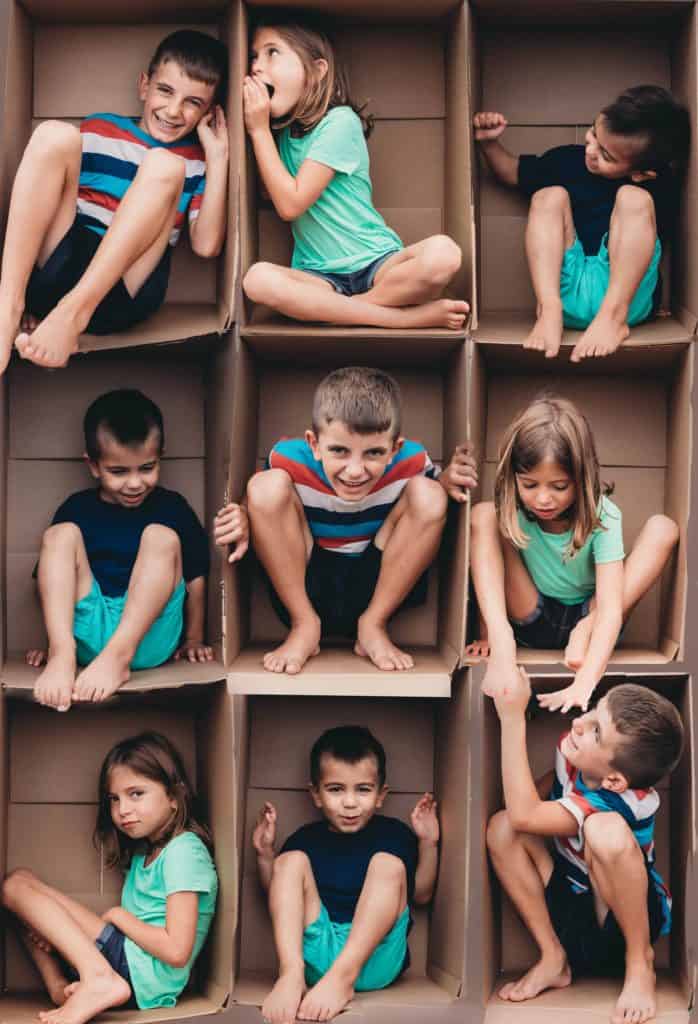
What you need
- A box (cardboard box works great)
- Your Camera
- Editing software, such as Adobe Photoshop (or Photoshop elements)
- Willing subjects
How to Prepare
- Tape the box flaps back the best that you can
- Set the box on a chair (this allows for feet and hands to hang over)
- Have some general ideas of what will happen in some of the boxes
Some ideas include whispering through the box, leaning over to look down or up, knocking on the box, and just being silly.
Take the pictures, one at a time.
When you're taking pictures make sure that you have sufficient light, and that you are on the same level of the box. You don't want to be looking down or up at the Box.
Try to take the pictures at the same time and place. You do not want the lighting to be very different among pictures.
Veronica June Photography suggests trying to fill the entire box with your body.

Editing The Pictures
Don't be discouraged if it takes you some time to figure out the editing. Play around with it and you will get the hang of it! Here are the basic steps.
I am a total NEWBIE to Photoshop, so if I can do this, so can you.


Final Thoughts
Try it out. Don't be too judgmental of yourself, and get ready for some fun!
If you found this helpful, share it!


THIS WAS SO COOL!!!! THANK YOU! I am going to try this!
What a neat idea! I appreciate the step by step on editing. I totally figured you somehow had everyone laying on the floor and stood really high to get them all in the shot. Not one by one. 🤷♀️😆
So awesome, thank you for this!
This is such a cute idea and I think you explained it really well!
So cute! And thanks for the tutorial! Now I just need more kids 🤣
This is so awesome. Thank you so much for the easy tutorial xx
That is an awesome idea. I often take pics of my daughter and her friends to capture those precious moments. I am definitely going to give this a try. Thanks for sharing!!!
You are a Rock Star!!!
Thank you very much for the tutorial that I can understand.
I think I can do it!!!
This is awesome. What size box did you use?
Thanks! I think it was 2x3 feet but I've done all different sizes before!